How Much VRAM Do You Need to Run Llama, Qwen, and DeepSeek?
The #1 question before buying any AI hardware. Here's a simple rule of thumb plus an exact VRAM table for every popular model size, from 3B to 70B, at 4-bit.
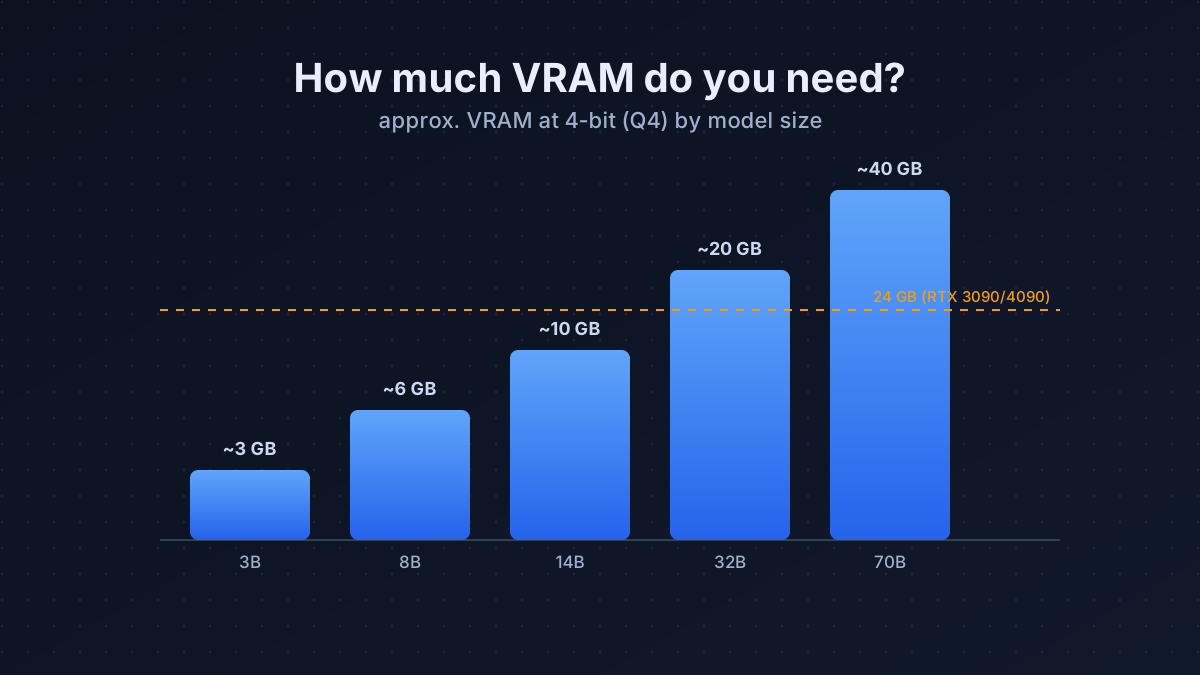
VRAM is the gatekeeper of local AI. Run out of it and the model either won’t load or spills into painfully slow system RAM. The good news: with 4-bit quantization (the standard for local use), the math is simple and forgiving. Get this one number right and you’ll never overspend on a card, or buy one that can’t run what you need.
The rule of thumb
VRAM (GB) ≈ parameters in billions ÷ 1.5 + 2–4 GB for context
A 4-bit weight is half a byte, so a 13B model is ~6.5 GB of weights, plus overhead for the KV cache (which grows with context length). Round up and leave headroom.
The VRAM table (4-bit, Q4_K_M)
| Model size | Weights ≈ | + context | Fits on |
|---|---|---|---|
| 3B | ~2 GB | ~3 GB | any modern GPU, even 6 GB |
| 8B | ~5 GB | ~6–8 GB | 8 GB card and up |
| 14B | ~8 GB | ~10–12 GB | 12 GB card and up |
| 32B | ~18 GB | ~20–22 GB | 24 GB card |
| 70B | ~38 GB | ~40–44 GB | 48 GB, or 24 GB at short context |
Quantization: the dial that sets your VRAM bill
“4-bit” isn’t the only option: quantization is a quality-vs-size trade-off, and choosing the right level is how you fit a bigger, smarter model on the card you already own:
| Quant | Bits/weight | VRAM vs FP16 | Quality |
|---|---|---|---|
| Q8_0 | 8 | ~50% | near-lossless; rarely worth the size |
| Q6_K | 6 | ~37% | excellent; the quality-conscious pick |
| Q4_K_M | ~4.5 | ~28% | the sweet spot: minimal quality loss, big savings |
| Q3_K_M | ~3.5 | ~22% | noticeable degradation; only when desperate |
For almost everyone, Q4_K_M is the right default: you keep ~95%+ of the model’s quality at roughly a quarter of the memory. Step up to Q6 only if you have VRAM to spare and want the last few percent; drop to Q3 only to squeeze a model that otherwise won’t fit at all.
Don’t forget the KV cache (the hidden VRAM eater)
Weights are fixed, but the KV cache grows with how much text the model is holding in context, and it can be surprisingly large. A rough feel: a 7B model at 8K context adds ~1 GB of cache; push to 32K context and that can be several GB. This is why two people running “the same model” can have very different VRAM needs.
Practical levers to control it:
- Cap your context to what you actually use. A 32K window you never fill just wastes VRAM.
- Enable KV-cache quantization (most runtimes support 8-bit cache) to roughly halve it.
- Budget for it: when sizing a card, add context headroom on top of the weights, never just the weights alone.
So what should you buy?
- 8 GB (e.g. RTX 3060): great for 8B models: plenty for chat, coding help, agents.
- 12–16 GB: comfortable up to 14B.
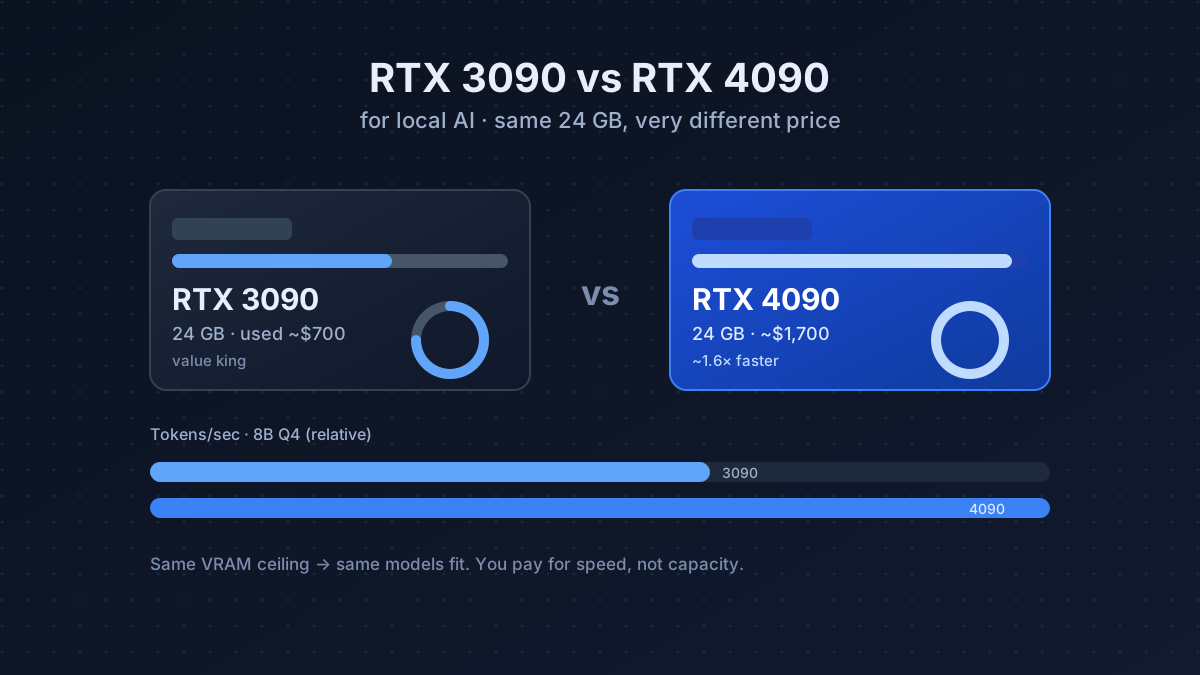
- 24 GB (RTX 3090/4090): the sweet spot: runs up to 32B easily and a 70B in a pinch.
- 48 GB (2× 24 GB): the home ceiling: runs a 70B at full context comfortably.
NVIDIA GeForce RTX 3090
- 24 GiB VRAM
- 350 W TDP
- 936 GB/s
- 2020
~$700 street price
24 GB is the single best capacity-per-dollar for local AI. It covers everything most people will ever run, including quantized 70B models at modest context. A used one is the card we’d buy first.
How to check what you can actually run
Don’t guess: measure. Two quick ways:
- Before downloading: apply the rule of thumb (billions ÷ 1.5 + context). If the total is under your card’s VRAM with a couple of GB to spare, it’ll fit.
- While running: watch
nvidia-smi(or your runtime’s memory readout) as you load the model and grow the context. If usage creeps toward your card’s limit, lower the context window or step down a quant before you hit an out-of-memory error.
Tools like Ollama and LM Studio will also warn you (or silently offload to RAM) when a model won’t fit; see our tools comparison for how each handles it.
A few more gotchas
- Higher quants need more. Q6 or Q8 give slightly better quality but use more memory.
- Two cards add up. 2× 24 GB = 48 GB usable for the biggest models, if your software supports splitting, often a smarter buy than one faster card.
- Offloading to RAM works, slowly. If a model almost fits, runtimes can push a few layers to system RAM. It runs, but expect a big speed hit; treat it as a stopgap.
Match the model to the card, not the hype. Most people are happiest running a fast 8B–14B on a card they already have than struggling to fit a 70B they don’t need. Once you know your number, the cheapest-way guide shows exactly what to buy.
Gear mentioned in this post
- Check RTX 3090 price
NVIDIA GeForce RTX 3090
24 GiB · ~$700
Frequently asked questions
How much VRAM do I need to run an 8B model?
About 6–8 GB at 4-bit, including room for context. An 8 GB card runs an 8B model comfortably for chat, coding help, and agents.
How much VRAM does a 70B model need?
Roughly 40–44 GB at 4-bit with usable context. That means a 48 GB setup, or a single 24 GB card only at very short context.
Can 24 GB of VRAM run a 70B model?
Just barely, at 4-bit and short context. A 24 GB card is the sweet spot for everything up to ~32B comfortably; a 70B fits only in a pinch.
Does context length affect VRAM usage?
Yes. The KV cache grows with context length, so long chats and large documents need several extra GB on top of the model weights.